

You delivered work, your client was happy and then money didn’t come.
Sound familiar? You’re not alone, millions of business owners around the world do everything right, great service, happy customers, repeat clients and still stuck in cash crunch at end of the month. Reason in many cases is not quality of their work, it’s their invoicing
Poor invoicing is one of the most expensive invisible problems in business. And most business owners don’t even realize they’re doing it wrong until they get late payments, calling clients for payments. Many small businesses, freelancers and growing companies struggle with invoicing without realizing how much they are losing because of it.
The good news is that these problems are not difficult to solve. You can improve invoicing process by using invoicing software which helps businesses speed up payment, reduce mistakes, and maintain stable cash flow. In this guide, we will explore how poor invoicing causes businesses to lose revenue and practical steps you can take to fix problem.
An invoice isn’t just piece of paper. it ‘s the moment your hard work turns into actual money in your bank account.
What is business invoicing?
An invoice is document sent to customer requesting payment for products or services provided. It acts as an official record of transactions between business and its client. Invoices help businesses track their income and maintain proper financial records. When invoicing is handled properly, it helps ensure that businesses receive payments quickly and efficiently. But when invoicing is poorly managed, it can create confusion and delay payments.
A standard business invoice usually includes:
- Business name and contact details
- Client information
- Description of products or services
- Total amount due
- Payment due date
- Accepted payment methods
How Poor Invoicing Causes Revenue Loss
Many businesses do not realize that poor invoicing can directly affect their revenue. Poor invoicing is not just sending bills late; it includes habits, processes and systems, from sending invoices with no due date to having no follow-up system when payments are overdue. This results in cash flow problems, weak client relationships, wasted time on admin work and in some cases, business failure. According to research, cash flow issues are number one reason small businesses close and most of those cash flow problems come from unpaid or delayed invoices.
Common mistake #1
Sending invoices too late
One of the most common and costly invoicing mistakes is simply waiting too long to send invoice after completing work. Many business owners think they should wait until “a good time” or until the end of the month to send all their invoices at once. This is costly habit.
The problem
Every day you delay sending an invoice is a day you delay getting paid. If you complete job/work on the 5th of month but send invoice on 28th, you’ve given your client an extra 23 days of free credit and they haven’t even seen payment terms yet.
The fix
Send your invoice same day you complete the work, or within 24 hours. If you’re working on long project, consider milestone-based invoicing: send invoices at key project stages rather than waiting until very end.
Common mistake #2
Unclear or incomplete invoice details
Unclear invoices create confusion and confused clients don’t pay quickly. Worse, they push your invoice to bottom of pile because they need to figure out what they’re actually paying for before they can approve it.
The problem
Invoices that say things like “Website work – $1,500” or “Consulting – April” give clients nothing to work with. Their accounts department has to search your invoice internally for approval, and that slows everything down.
The fix
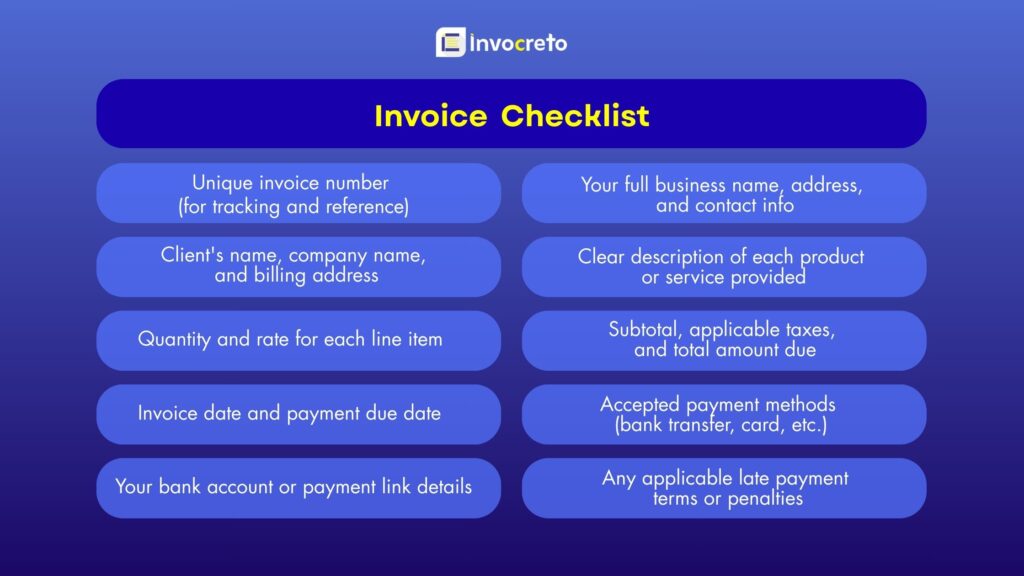
Every invoice should include: unique invoice number, your business name and contact details, client’s name and billing address, clear itemized breakdown of services, total amount due, payment due date, accepted payment methods, and your bank details or payment link.
Common mistake #3
No clear payment terms
If your invoice says “please pay at your earliest convenience,” you’re going to be waiting very long time. “Earliest convenience” could mean next week, next month, or whenever they remember. Unclear payment terms create gap, and clients unconsciously fill that gap by deprioritizing your payment.
The problem
Without specific due date and clear payment terms, clients feel no urgency to pay. Your invoice enters queue and may stay there for long time, especially in large companies with formal payment processes.
The fix
Always include specific due date (e.g., “Payment due: 15 April 2026”) rather than unclear terms like “Net 30.” Add an early payment discount, for example, 2% off if paid within 7 days. Also, clearly state your late payment policy
Pro tip: Shorter payment terms get paid faster. Research consistently shows that “Net 7” invoices get paid much faster than “Net 30.” Start with shorter terms you can always negotiate if specific client needs more flexibility.
Common mistake #4
No follow-up system for overdue invoices
Most business owners send an invoice and then wait. And wait. And then finally send “just checking in” email weeks later. This is not system it’s a recipe for slow payments and awkward relationships.
The problem
Without structured follow-up process, unpaid invoices can sit for weeks or months. Many clients don’t pay simply because they got busy and forgot. Gentle, professional reminder is all it takes. But without a system, you’re relying on memory (which fails)
The fix
Build simple follow-up schedule: send friendly reminder 3 days before due date, polite follow-up on due date, clear reminder 7 days after, and follow up more seriously if it’s 14 days overdue. Make this automatic most invoicing software will do this for you.
Common mistake #5
Sending invoices with errors
An invoice with wrong amount, the client’s name spelled incorrectly, or outdated bank details is not just embarrassing it can delay payment by weeks. The client has to report the error, you have to issue corrected invoice, they need to approve it internally, and the payment term starts over.
The problem
Creating invoices manually is prone to mistakes. Errors like incorrect amounts, wrong tax calculations, duplicate invoice numbers, or outdated client information can delay payments and harm your professional reputation.
The fix
Use invoicing templates or software that auto-populates client details and performs calculations automatically. Always double-check amounts before sending. And keep your client database up to date, right contact person and billing address.
Common mistake #6
Not offering multiple payment options
If your only payment option is bank transfer, you’re already losing money. Different clients have different preferred payment methods and struggling with the payment process means delayed payment.
The problem
Clients who have to manually enter bank details, make international wire transfers, or use an unfamiliar payment method will likely delay payment. Even small inconveniences, when multiplied across many clients, can lead to major delays.
The fix
Offer at least 3–4 payment options: bank transfer, cards, PayPal or payment via your invoicing software’s payment integration like Razorpay. The easier you make it to pay, the faster you’ll get paid.
Signs Your Invoicing Process Needs Improvement
Many businesses only notice invoicing problems when they start facing cash flow issues.
Here are some common warning signs:
- Customers frequently pay late
- You spend too much time creating invoices
- Clients ask for invoice corrections often
- You struggle to track unpaid invoices
- Business income becomes unpredictable
If you notice these problems regularly, your invoicing system needs improvement.
How invoicing software fixes everything above
As businesses grow, managing invoices manually becomes difficult and time-consuming. This is why many companies now rely on invoicing software to manage billing efficiently. Invoicing software for small businesses helps automate entire invoicing process, saving time and reducing errors.
Faster Invoice Creation
Modern invoicing tools allow businesses to generate professional invoices in minutes. Instead of manually entering details each time, it speeds up the invoicing process and reduces mistakes. software automatically fills in information such as:
- Client details
- Business information
- Tax calculations
- Payment totals
Real-Time Invoice Tracking
With invoicing software, businesses can easily track status of every invoice. This visibility makes it easier to manage cash flow and follow up on unpaid invoices.You can instantly see whether an invoice is:
- Paid
- Pending
- Overdue
Professional Branded Invoices
Most online invoicing tools allow businesses to customize invoices with their logo and brand colors. Professional invoices improve credibility and create positive impression on clients. With invocreto invoicing software, you can select any template that matches your brand and customize it.
Faster Online Payments
Another major advantage of invoicing software is online payment integration, which often leads to faster payments. Clients can pay directly from the invoice using:
- Credit cards
- Online payment gateways like Razorpay
- Digital wallets
- Bank transfers
Benefits of Invoicing System
1. Faster Payments
One of biggest benefits of an invoicing system is faster payments from clients. When invoices are clear, professional, and sent right after the work is completed, clients are more likely to pay quickly. Invoices that clearly show payment amount, due date, and payment methods remove confusion and make it easier for clients to pay.
Automated invoicing software can also send payment reminders automatically. These reminders notify clients before due date and help reduce delayed payments. Faster payments help businesses maintain a steady cash flow and reduce financial stress.
2. Better Cash Flow Management
Healthy cash flow is essential for any business. An efficient invoicing system make sure that payments arrive on time, which helps businesses manage their daily expenses more effectively. When invoices are sent regularly and payments are tracked properly, business owners can better predict their income. This makes it easier to plan for important expenses such as:
- Employee salaries
- Rent and utilities
- Inventory purchases
- Business investments
3. Reduced Billing Errors
Manual invoicing often leads to mistakes such as incorrect pricing, missing tax details, or wrong customer information. These errors can delay payments and damage client trust.
An invoicing software system helps reduce these mistakes. Automation calculates totals, taxes, and payment details automatically, minimizing the chances of human error. When invoices are accurate, clients can process payments quickly without asking for corrections.
4. Professional Business Image
Invoices are part of how you communicate with clients. Sending clear and professional invoices creates strong impression. A well-designed invoice with your logo, simple layout, and accurate details shows that your business is organized and reliable. It also makes it easier for clients to review charges and understand services provided. This professionalism builds trust and makes clients more confident working with you.
5. Stronger Client Relationships
Clear and transparent invoices help maintain good relationships with clients. When invoices clearly explain services, pricing, and payment terms, there is less confusion. This openness helps build trust between business and its customers.
Sending polite payment reminders and offering multiple payment options also shows that the business values convenience and clear communication. Strong client relationships often lead to repeat business and long-term partnerships.
6. Better Financial Organization
Online invoicing software keeps all financial records organized in one place. Businesses can easily access past invoices, payment history, and transaction records whenever needed.
This organized system helps businesses:
- Track income accurately
- Monitor outstanding payments
- Maintain proper financial records
- Prepare financial reports
7. Easier Tax Preparation
Tax season can be stressful for many businesses, especially when financial records are incomplete or disorganized. A good invoicing system keeps track of all transactions, making it easier to calculate total income and prepare tax reports. Businesses can quickly generate reports that show revenue, outstanding invoices, and payment history. This organized approach saves time and reduces stress when filing taxes.
With Invoceto, you can download GSTR-1 report in just one click and you can file all your GST returns with help of Indiacorporates.
8. Improved Business Efficiency
When invoicing processes are streamlined and automated, businesses save good amount of time. Instead of spending hours creating invoices manually, business owners and employees can focus on more important tasks such as sales, marketing, and customer service.
Automation helps speed up routine tasks like:
- Creating invoices
- Sending payment reminders
- Tracking payments
- Generating reports
9. Increased Revenue Opportunities
When invoicing systems work efficiently, businesses spend less time chasing payments and more time focusing on growth. A reliable invoicing process helps businesses manage more clients, complete more projects, and increase revenue. It also reduces risk of losing money due to missed invoices or delayed payments. In long run, an efficient invoicing system supports steady business growth and financial stability.
Build cash flow culture, not just better invoices
Fixing your invoicing process is not just about documents you send, it’s about building professional culture around getting paid. Here are some additional strategies that make a big difference:
Discuss Payment Terms Before You Start Work
One of the most effective steps is to set expectations early. Before starting a project, confirm payment terms in writing. If the client agrees upfront to pay within 14 days by bank transfer, there’s no confusion later. Include this in your onboarding or proposal process.
Require Deposit for Large Projects
For projects above a certain value such as anything over $2,000 ask for a 25% to 50% deposit before starting the work. This protects you from non-payment and ensures the client is financially committed to project. It can also help filter out clients who were not serious in first place.
Stop Working for Non-Paying Clients
This may sound obvious, but many business owners continue working for clients who already have overdue invoices. This increases financial risk. Set clear policy: if an invoice is more than 30 days overdue, pause any further work until the payment is cleared.
Keep Your Invoice Records Organized
Poor record-keeping can lead to lost invoices, duplicate billing, or missed follow-ups. Keep a central record of every invoice, including its number, date sent, due date, amount, and payment status. Invocreto invoicing software tracks this automatically, so you always have organized records of every invoice.
Key insight: Businesses that switch from manual invoicing to invoicing software report getting paid an average of 14–20 days faster. For a business with $500,000 in annual revenue, that could mean $20,000+ in improved cash flow every year money that was always owed to them but was sitting in someone else’s account.
Final Thoughts
Poor invoicing may seem like minor operational issue, but it can directly affect your revenue. Late invoices, billing mistakes, unclear payment terms, and missed follow-ups can all delay payments and create cash flow problems.
The good news is these problems are easy to fix with right approach.
By sending invoices on time, keeping records organized, offering flexible payment options, and using modern invoicing software, businesses can streamline their billing process and get paid faster. A well-managed invoicing system does more than collect payments; it supports financial stability, strengthens client relationships, and helps your business grow confidently. If your business struggles with delayed payments or unpredictable cash flow, improving your invoicing process with online invoice software could be the simple change that makes a big difference.
Treat your invoices as seriously as you treat your work. You’ve already earned money; your invoicing system is the bridge that brings it to you.
No comments yet