

Table of Contents
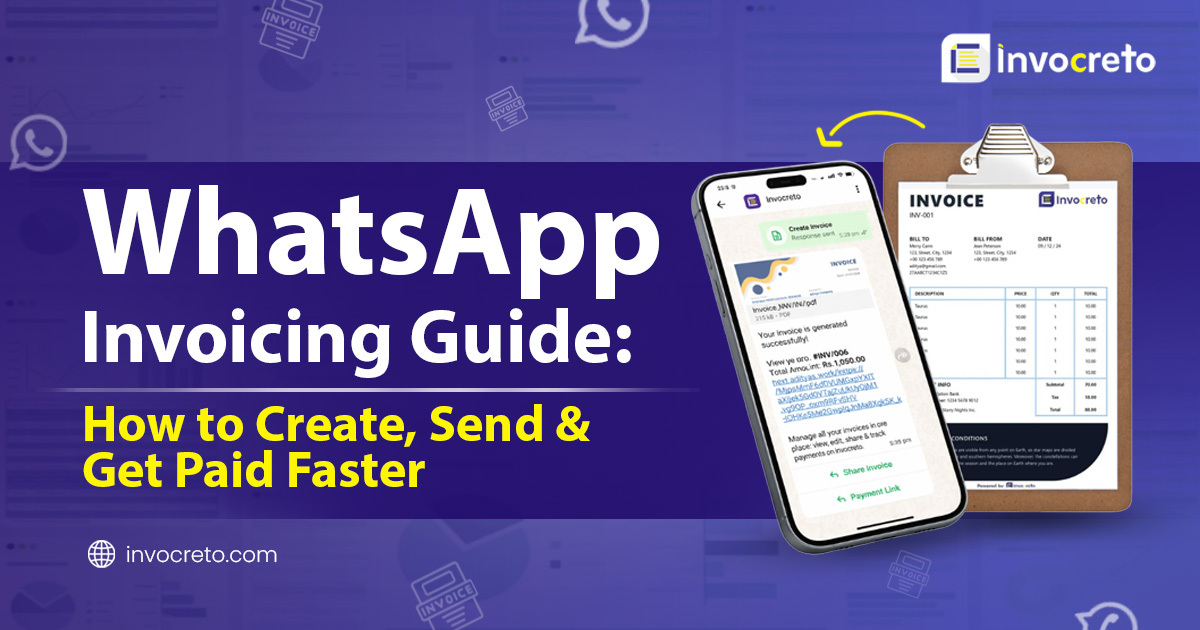
Managing invoices is now faster and simpler than ever. With our WhatsApp Invoicing feature and online invoicing software, you can create invoices, share them and get paid with secure payment links all directly through your daily use app “WhatsApp”.
If you run a small business, work as a freelancer, and need a simple invoice billing software, this method helps you save time and get paid faster without switching between multiple apps.
We’ve recently launched our new WhatsApp invoicing feature, designed to help businesses handle everything from invoicing to payment all in one place, “WhatsApp”. This guide will walk you through complete step-by-step process.
What makes our WhatsApp invoicing feature special?
- One-time setup: Get started quickly with minimal effort using simple online invoicing software
- No need to switch apps: Create, manage, and Send Invoice on WhatsApp all from one place
- Automatic invoice sharing: Instantly share invoices with your customers on WhatsApp
- Instant payment link generation: Use a built-in Payment Link Generator to collect payments faster
- Saves time and effort: Automate your billing process with smart invoice
- Perfect for everyone: freelancers, startups, and businesses needing reliable billing software for small businesses and smooth Freelance Billing
invocreto invoicing software one-time setup
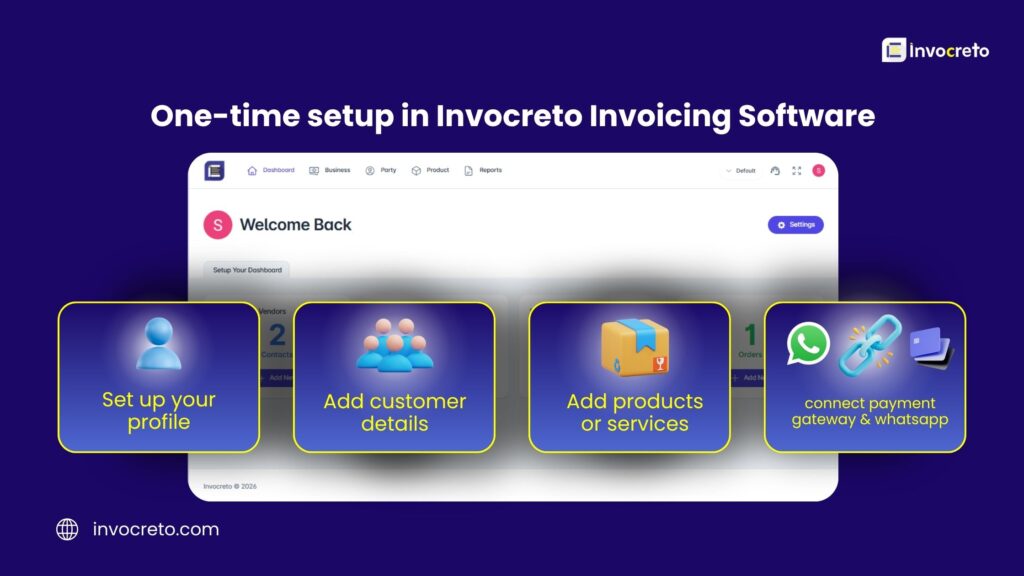
Before you start using WhatsApp invoicing, you need to complete quick and simple setup in our system. This is one-time setup, after that you can easily create, manage and send invoices directly through WhatsApp without setting up again.
Step 1: Log in to your account
First, log in to invocreto invoicing software. After login, complete your profile by adding basic business information like name, email and contact details.
Most important: verify your WhatsApp number to connect it with system. Once verified, you can easily send invoices on WhatsApp
Step 2: Add customer details
In this step, you add your customer information. This is one-time setup and data will be saved for future use.
- Got to your dashboard
- Click on customers & vendors option
- Entre customer name
- Add phone number
- Add company name (if any)
- Add GST number (optional)
Step 3: Add products or services
In this step, you need to add products or services you sell. This helps you create invoices faster in future without entering details again.
- Go to your dashboard
- Click on products or services option
- Set price
- Add short description (if needed)
- Save details
Step 4: connect payment gateway
In this step, you connect payment gateway so you can easily collect payments from your customers. This is important step in WhatsApp invoicing because it allows you to generate and share payment links instantly.
- Go to settings in your dashboard and click on payment gateway
- Connect your account with Razorpay
- Enable online payment options ( UPI, card or net banking)
Step-by-step WhatsApp invoicing process
Once you have completed setup steps, you can manage your entire billing process directly through WhatsApp invoicing without needing to open software every time.
Step 1: Start Chatting with Invocreto
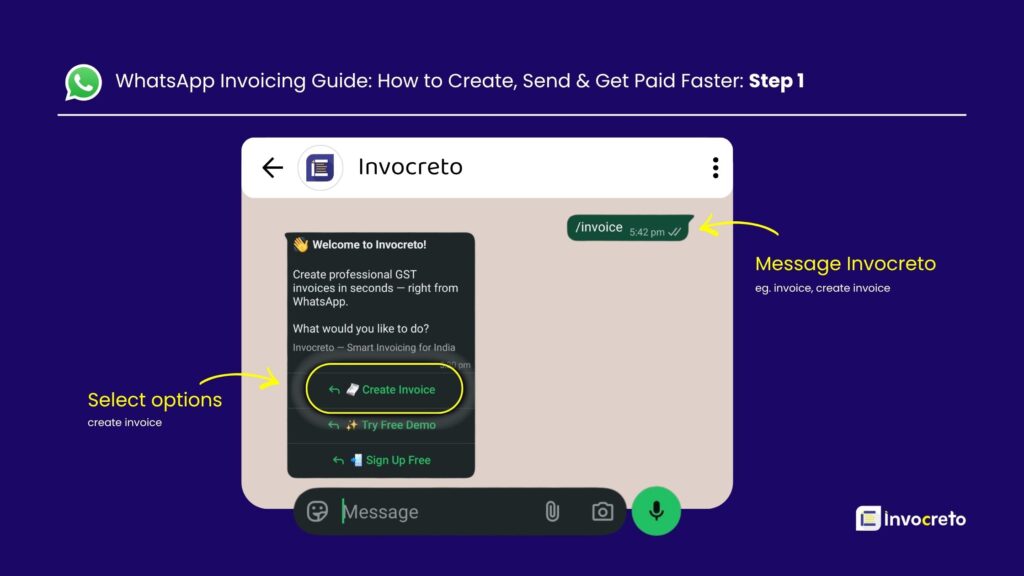
- To begin WhatsApp invoicing, simply start chat with invocreto on WhatsApp. Send message like ‘invoice’ or ‘create invoice’ to get started.
- After sending message, you will receive reply from Invocrerto with multiple options. Tap on ‘create invoice’ option to proceed.
Step 2: Create Invoice
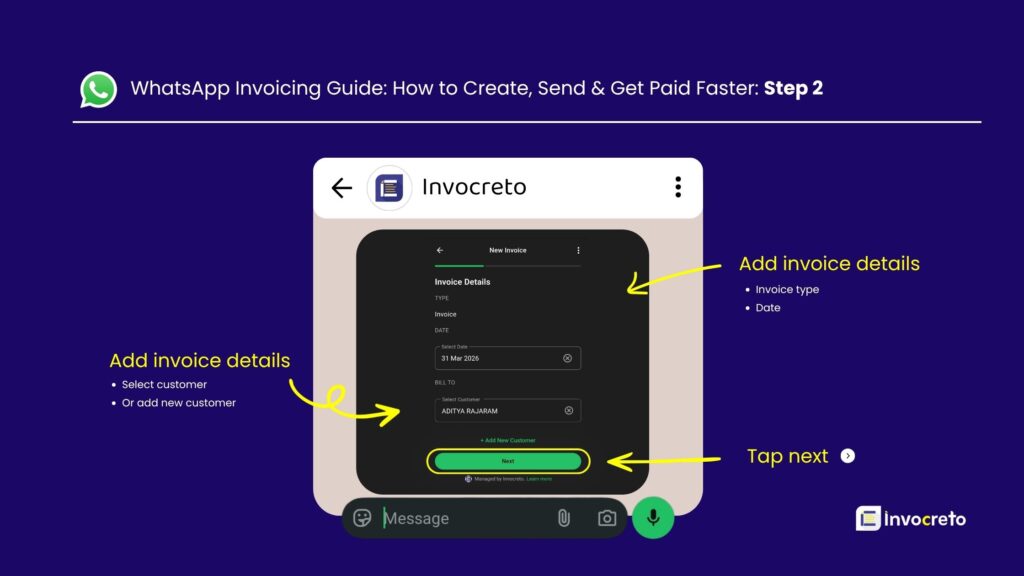
After selecting Create Invoice, a pop-up window will appear on your screen
- Select type of invoice (invoice or proforma invoice)
- Choose or add invoice date
- Select existing customer or add new one
- Once all details are filled correctly, tap on next button to move forward.
Step 3: Add Products or Service Details
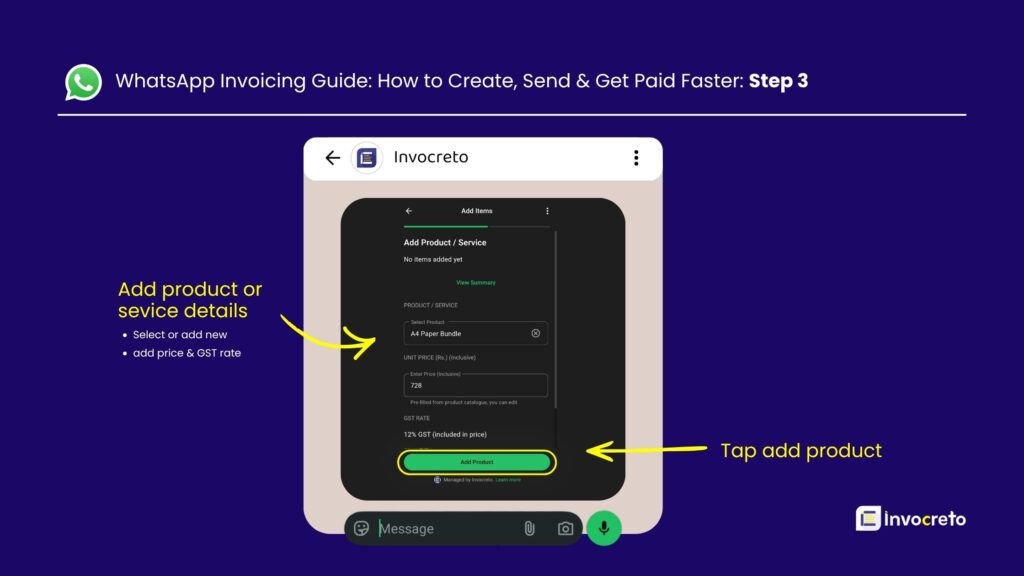
Now select products or services you already saved in invocreto software. This helps you create invoice faster without entering details again.
- Choose your saved product or service or you can add new
- Price and GST rate will be filed automatically (based on saved data)
- You can edit price or GST rate if needed
- You can add multiple products or services in one invoice
- Once done. Tap on view summary
Step 4: Generate Invoice
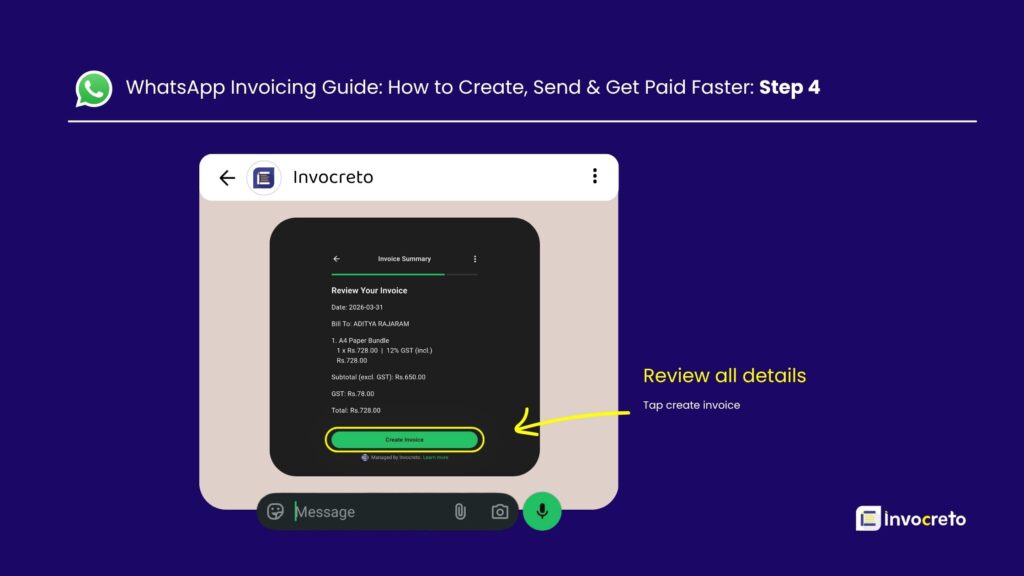
Now review all invoice details carefully before finalizing. Check customers information, products or services added, price and GST details to make sure everything is correct
- Review all invoice details
- Verify customer and product information
- Check total amount and GST calculation
- Tap on create invoice button
Step 5: Share Invoice
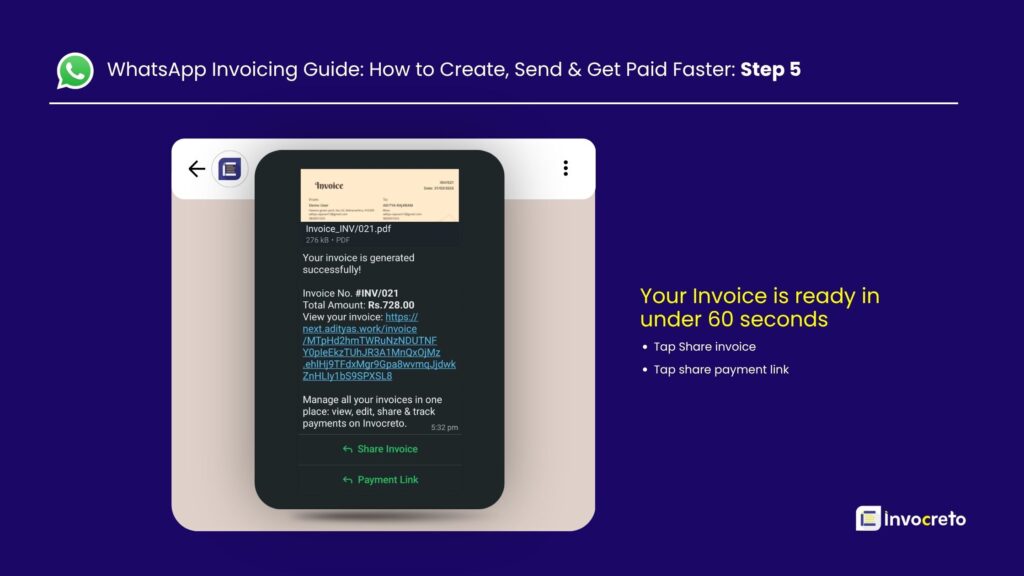
Your invoice is now ready in less than 60 seconds using WhatsApp invoicing. The process is simple and quick, helping you manage billing without any delay.
- Tap on share invoice
- Send it to customers on WhatsApp in one click
- Your client will receive greeting message along with invoice PDF
Step 6: Share Payment Link
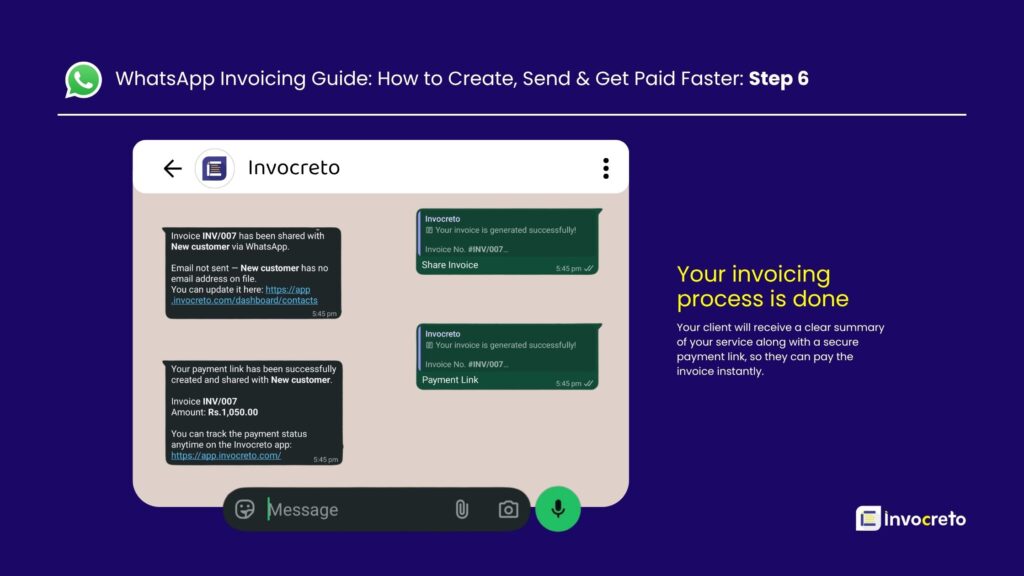
- After sending invoice, tap on share payment link
- A live payment link is created automatically
- Client receives invoice details with payment link on WhatsApp
- Client can pay online using options like UPI, card or net banking. This makes payment collection simple and fast, improving your invoicing experience.
Note: to share live payment link on WhatsApp, you must first connect payment gateway like Razorpay from your invocreto dashboard.
Final thoughts
Our WhatsApp invoicing feature is designed to make your entire workflow simple, fast and hassle-free. You only need to log in once, add your basic business details and you are ready to start. After that, you can easily create invoices, share them and collect payments directly through WhatsApp.
There is no confusion and no extra complicated steps. Everything is smooth, organized and built to support your daily business operations. With features like GST invoices India, payment link generator and instant invoice sharing you can manage your business more professionally and efficiently.
Start using WhatsApp invoicing today and take your business to next level with faster and smarter way of billing.

3 comments
This would definitely be a game-changer for freelancers who need quick payments. Being able to send invoices directly through WhatsApp makes the process so much smoother.
This WhatsApp invoicing guide really highlights how much simpler and faster the billing process can be when everything is integrated into a platform we already use daily. It’s great to see a solution that eliminates the back-and-forth of switching apps and streamlines payment collection directly from conversations. The automatic sharing and payment link features seem like game-changers for freelancers and small businesses looking to save time.
The shift to handling invoicing and payments directly within WhatsApp is a game-changer for freelancers who are tired of juggling multiple apps. Eliminating the friction of switching between billing software and messaging platforms definitely speeds up the payment cycle. It is refreshing to see a solution that automates the entire workflow with just a one-time setup.